Architecture & Visualizations
This page provides visual representations of SimPM’s structure, class hierarchies, and component relationships.
SimPM Architecture
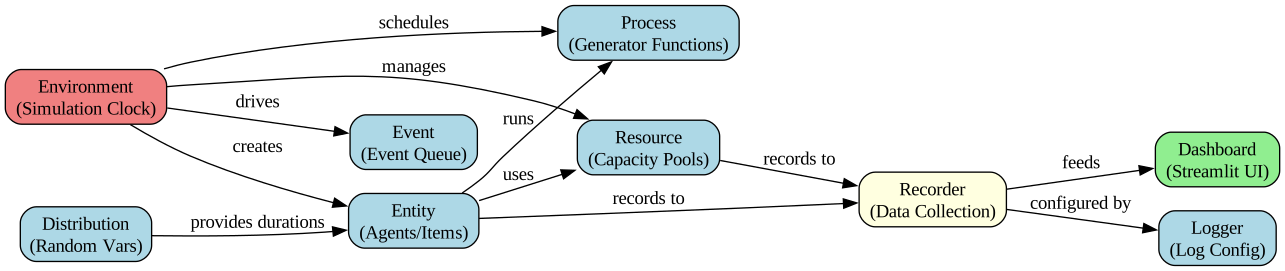
The following diagram shows the core components of SimPM and how they interact:
Key Components:
Environment – Central simulation engine that manages time and events
Entity – Agents that execute processes and interact with resources
Resource – Shared capacities that entities compete for (crews, equipment, etc.)
Distribution – Probabilistic models for durations and quantities
Process – Generator functions that define entity lifecycles
Event Queue – Priority queue that drives simulation forward
Recorder – Collects and logs simulation data
Dashboard – Interactive web interface for visualization
Logger – Centralized logging configuration
Class Hierarchy
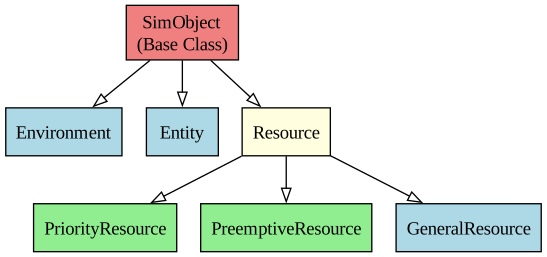
The following diagram shows the relationship between SimPM’s main classes:
Class Descriptions:
SimObject – Base class for all simulation objects
Environment – Container and clock for simulation
Entity – Items/agents that move through the system
Resource – FIFO capacity with queue management
PriorityResource – Resources with priority-based queue ordering
PreemptiveResource – High-priority tasks can interrupt low-priority ones
GeneralResource – Generic wrapper for custom resource types
Simulation Workflow
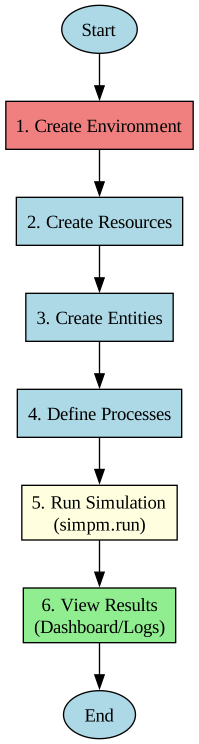
The typical workflow for creating and running a SimPM simulation:
Workflow Steps:
Create Environment – Initialize the simulation clock and event scheduler
Define Resources – Specify shared capacities (loaders, crews, equipment, etc.)
Create Entities – Instantiate agents/items that will move through the system
Define Processes – Write generator functions describing entity behavior
Schedule Processes – Register processes with the environment
Run Simulation – Execute until no future events remain (optionally show dashboard)
Analyze Results – Extract statistics, view logs, or export data
Data Flow
How data flows through SimPM during a simulation:
Data Flow Pipeline:
User Code → Defines simulation structure (entities, resources, processes)
Environment → Processes events and advances simulation clock
Entities & Resources → Execute processes and generate events
Recorder → Collects all simulation data (activities, queues, status changes)
Storage → Data stored in three main logs:
Schedule Log – Entity activities and timings
Queue Log – Resource waiting times
Status Log – State changes over time
Output → Data visualized or exported:
Dashboard – Interactive Streamlit interface
CSV Export – Data files for external analysis
Module Dependencies
Here’s an overview of the main SimPM modules and their dependencies:
Core Modules:
simpm.des– Discrete-event simulation engineEnvironment
Entity
Resource variants (Resource, PriorityResource, PreemptiveResource)
simpm.dist– Probability distributionsTriangular, Normal, Exponential, Beta, etc.
Supports 3-point and PERT estimates
simpm.recorder– Data recording and loggingEntity schedule logging
Resource queue logging
Status change logging
simpm.dashboard– Interactive web interfaceStreamlit-based visualization
CSV export functionality
Multiple run support
simpm.log_cfg– Centralized logging configurationConsole and file logging setup
Log level management
Typical Import Pattern:
import simpm
import simpm.des as des
import simpm.dist as dist

# Create simulation environment
env = des.Environment("My Project")

# Define resources with logging
loader = des.Resource(env, "loader", log=True)

# Create entities
trucks = env.create_entities("truck", 10, log=True)

# Define stochastic durations
load_time = dist.triang(5, 7, 9)

# Run with dashboard
simpm.run(env, dashboard=True)
Key Design Patterns
1. Generator-based Processes
SimPM uses Python generators to define entity processes:
def truck_process(truck, loader, dumped_dirt):
    while True:
        # Wait for resource
        yield truck.get(loader, 1)

        # Perform activity
        yield truck.do("loading", 7)

        # Release resource
        yield truck.put(loader, 1)

        # Output to inventory
        yield truck.add(dumped_dirt, 60)
2. Dictionary-like Attributes
Entities support arbitrary metadata:
truck["load_size"] = 40
truck["priority"] = 2
truck["wbs_code"] = "A-123"

# Access in process
def process(entity, resource):
    duration = 5 + entity["load_size"] / 20
    yield entity.do("loading", duration)
3. Time-weighted Statistics
Resource and entity status logs are weighted by duration:
# Time-weighted average utilization
loader.average_utilization()

# Time-weighted statistics
loader.status_log().describe()
4. Composable Resources
Multiple resource types for different scenarios:
# FIFO queue
basic_res = des.Resource(env, "basic")

# Priority queue
priority_res = des.PriorityResource(env, "priority")

# Preemptive (can interrupt)
preempt_res = des.PreemptiveResource(env, "preempt")
See Also
Getting started with SimPM – Quick start guide
Project modeling concepts in SimPM – Conceptual overview
API Reference – Complete API reference
SimPM Tutorials – Detailed tutorials